
Challange7ParkerClegg.yxmd (28.0 KB)

Challenge7.yxmd (29.2 KB)


Challenge 7.yxmd (27.9 KB)
Good stuff
Thanks for the challenge!
GoliathCleaning.yxmd (24.9 KB)


GoliathCleaningChallenge.yxmd (26.4 KB)

Thanks for the challenge - strangely enough, the hard part for me was getting to select only top 10 or 25 using the select records tool.
I enjoyed this one! I chose to use sample at the end but apart from that, I think my solution was very similar to yours.

Challenge7_Workflow.yxmd (30.0 KB)

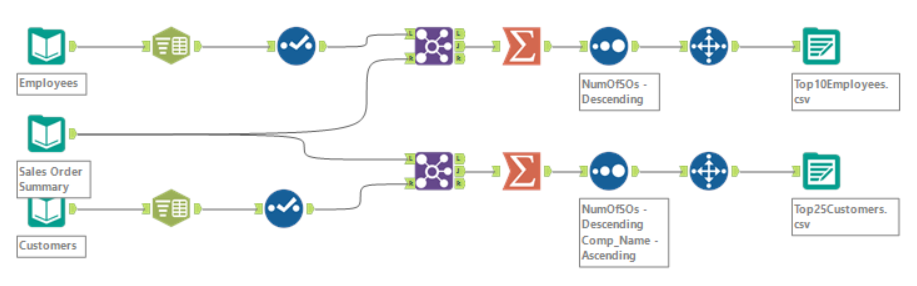
GoliathCleaning.yxmd (26.2 KB)
Fun challenge! It was good for me to understand how to parse better.
GoliathCleaning.yxmd (27.2 KB)
1 Like


Challenge7WOrkflow.yxmd (30.2 KB)
This was a good challenge. I struggled with getting my text to columns function to work initially but eventually I worked it out!
1 Like


I tried doing something with RegEx initially, but found the Text-to-Columns tool and it was very helpful for this problem, it made it super easy for this dataset. I’d be curious about doing this with data that is less organized. If the separators weren’t there, would RegEx be the best option? Or is there another tool we could use? It would definitely provide for a more challenging parse of the data.
Anyway here’s my results:


1 Like

This was a great challenge, I thought it was cool that we could join the transactions table to two other tables at once!
Challenge7_Goliath_JamesGerstner.yxmd (28.0 KB)

GoliathCleaning.yxmd (30.2 KB)
I felt silly after getting stuck on the data parsing. I forgot that you need to select the data after it has been parsed! Thanks for the challenge!
New Workflow3.yxmd (26.0 KB)

1 Like