
I attempted to make this easy visually, I would put some more work into the arrows but also wanted to make sure I could do this challenge fast, beacuse it is an easy task. I spent some time figuring out the order but only spent 12 minutes designing it. I hope you like this one!

This is my solution! I am currently learning about the audit process, so it was fun to put into action what I have been learning. I loved being able to use excel for more than just entering data.
1 Like

This is my solution. I created this in Excel and first decided where to put each box. Then I re-arranged the arrows to make this as efficient as I could! This was a fun challenge to explore creativity and planning on excel.
2 Likes

My solution was very similar to yours Donovon. I felt that some roles were shared by the senior and the manager more than yours did. I also added some longer connecting arrows to help understand the flow of information.

Here is my solution Challenge33AssemblingAuditFlows.xlsx
Challenge33AssemblingAuditFlows.xlsx (14.6 KB)
Here is my Flowchart uploaded on Excel

Challenge33AssemblingAuditFlows.xlsx (14.2 KB)
Here is my work! I kept it pretty simple and it helped me understand the audit process a little better.

here is my solution
Challenge33AssemblingAuditFlows.xlsx (13.6 KB)
Here is how I described the audit process! The steps I used made sense in the order I put them in. I color coded each section of the auditing process to make it look more beautiful too
Challenge33AssemblingAuditFlows.xlsx (17.3 KB)

My thought process behind this was that those higher than the associate were able to check the associate’s work since a lot of the responsibility falls upon him. So you can see that much of the connection involves reviewing and ensuring the work in the leadership

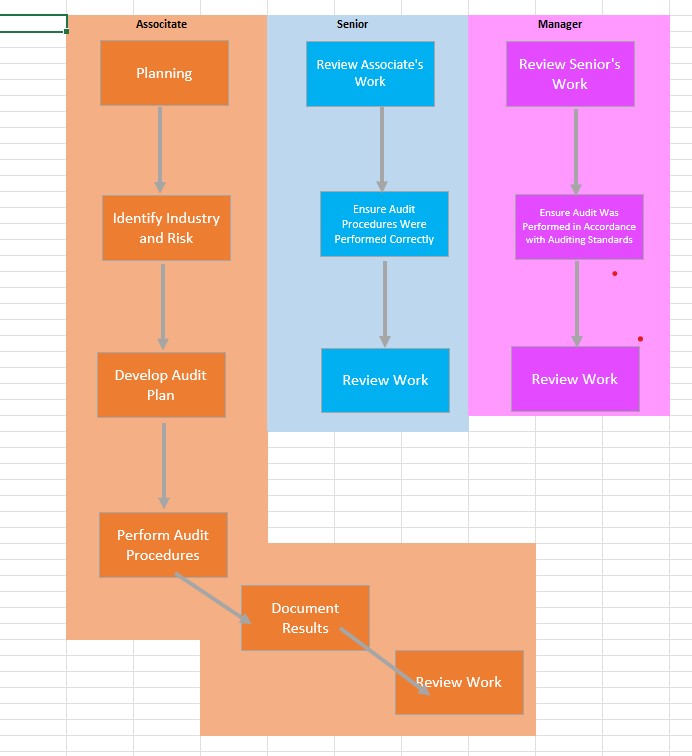
I separated the responsibilities into three different columns for each job title. The different colors represent what responsibilities go with which employee and keeps it organized.
Challenge33AssemblingAuditFlows.xlsx (21.0 KB)
Enjoyed this quick challenge of a review on audit roles and simple excel tasks.
1 Like
Here is my solution.
Challenge33AssemblingAuditFlows.xlsx (18.5 KB)
2 Likes
Here is my flowchart!

I felt like I would just follow the natural flow of everything to keep it simple and straightforward. For me, it is easier to take in and follow when there are not arrows going all over the place. I also just had all areas (associate, senior, manager) have an arrow towards one box titled ‘review work’ instead of three separate ones to eliminate unnecessary and repetitive information.

