BYU Student Author: @Spencer
Reviewers: @Mark, @Marco, @klayton
Estimated Time to Solve: 25 Minutes
We provide the solution to this challenge using:
- Excel
- VBA
- Python
Need a program? Click here.
Overview
As a new hire at a small accounting firm, your task is to prepare the P&L statement for one of your clients, the “Cookie Company”. All P&L data has been correctly accounted for and placed in the statement. However, there are some accounts with zero balances that need to be removed. Your task is to remove these accounts using a flexible VBA macro (so that next month, the task can be completed by simply clicking button).
Instructions
Your VBA macro must do the following:
- Duplicate the “P&L” tab and rename it “Final P&L” (we don’t want to write over the original P&L document).
- Within the “Final P&L”, iterate through each account. If the value of the account is 0, delete the entire row.
- Once all zero-balance accounts have been deleted, hide column F (column F contains random notes).
- After these tasks are complete, have a message box pop up that says “The Final P&L is ready for review. ____ accounts have been removed.” Fill in the “____” with the number of accounts/rows your macro removed.
- Place the macro inside the green box in the “Macro” tab. This will create a button you can use to run your macro.
Data Files
Suggestions and Hints
- If you keep receiving a “Type mismatch (Error 13)” while iterating through the account balances, try using an “If IsNumeric()” statement.
- To use an integer variable in a message box, you will need to place the variable inside the “CStr()” function.
Solution
Your macro should have deleted 12 accounts/rows.
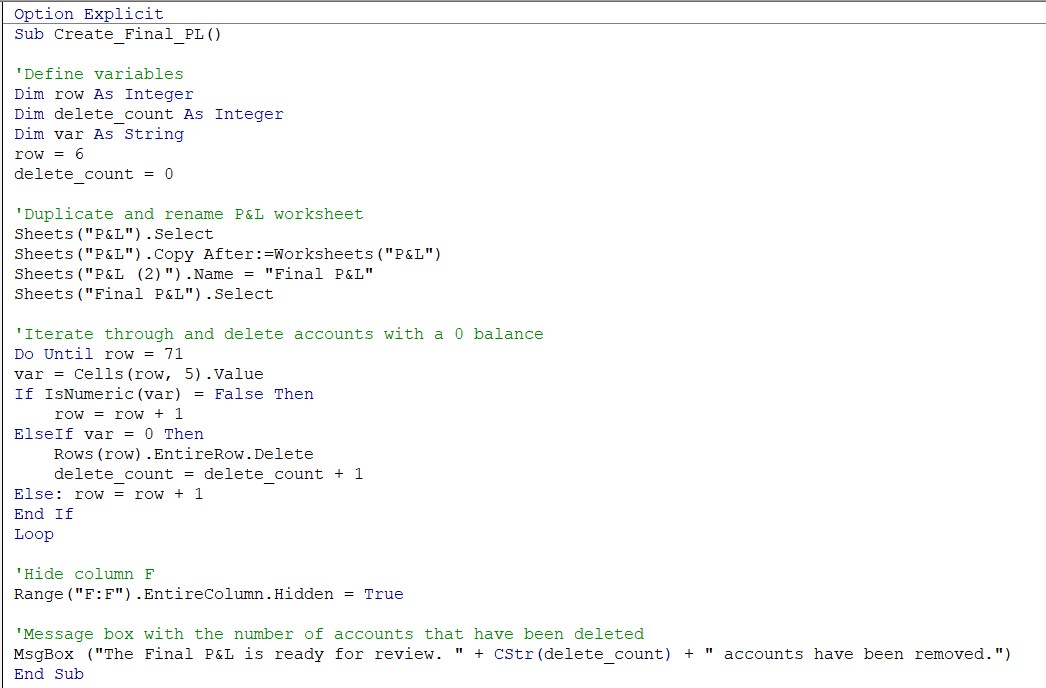
Challenge127_Solution.xlsm
Solution Video: Challenge 127|EXCEL&VBA – P&L Prep
