BYU Student Author: @Sterling_Lane, @James_Behling
Reviewers: @Andrew_Wilson, @Marta_Ellsworth, @Kaden_Sandberg @Kiya_Smith
Estimated Time to Solve: 45 Minutes
We provide the solution to this challenge using:
Need a program? Click here.
Overview
As the current Regional Manager at the Simple Screenprinting branch in Orem Utah, you are becoming concerned about an impending corporate audit that specifically targets your sales team. While acknowledging their exceptional performance, corporate seems to also suspect the figures may be overly optimistic. How dare they! As such, they are requesting that you review the recorded sales from 2010 to 2020 and ensure they align appropriately with the volume of products dispatched. You need to ensure the sales data is accurate and complete for corporate so they don’t find any wrongdoing at your branch.
Instructions
-
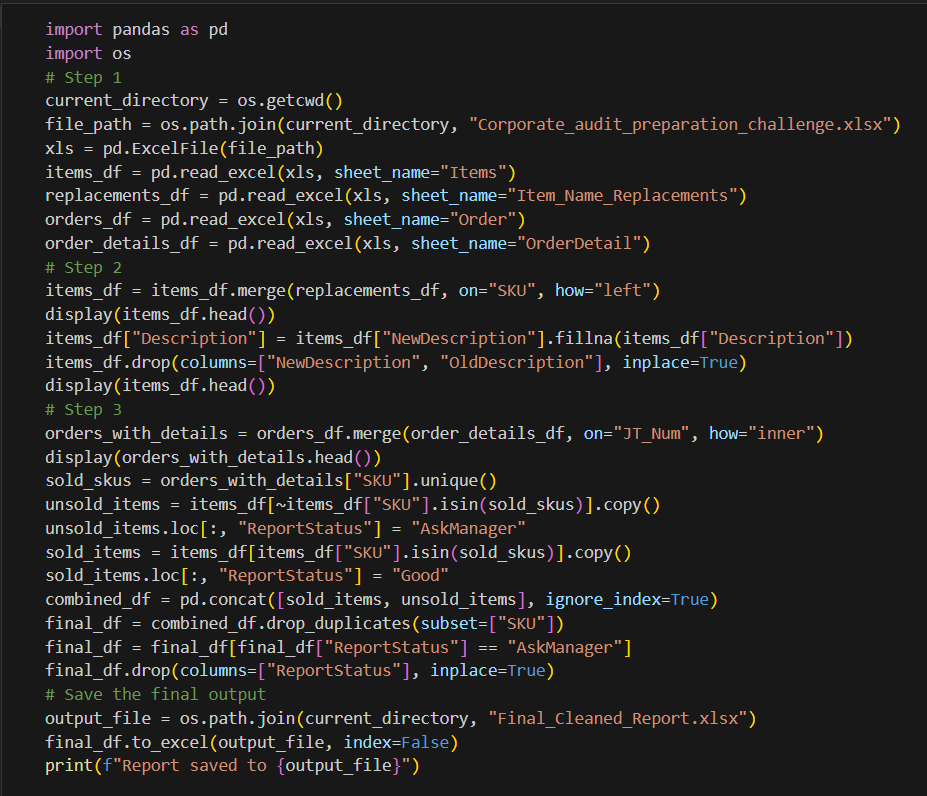
Download the provided Excel file and read all relevant sheets into pandas DataFrames using pd.read_excel(). The sheets in the file are:
a. Items (contains all available items)
b. Item_Name_Replacements (a mapping of old item names to updated names)
c. Order (contains order information)
d. OrderDetail (contains details for each order) -
Update the Description field of the Items DataFrame where the description is outdated. The old and new descriptions are contained in the Item_Name_Replacements excel sheet.
-
Identify the SKUs for items that haven’t been sold from the start of 2010 to the end of 2020. Output an excel file of these items to send to Corporate. Hint: the OrderDetail sheet and Order sheet are connected through the JT_Num field, which acts as the order identification number.
a. Use pd.merge() to join the Orders and OrderDetails sheets. Perform an inner join on the OrderID column to ensure only orders that have corresponding order details are kept. Name this new DataFrame “orders_with_details”.
b. Create an array of unique SKUs from the orders_with_details DataFrame. Name this array “sold_skus”. This array will be used in later steps.
c. Create a new DataFrame called “unsold_items” from the items_df filtered to only contain SKUs that are not in the sold_skus array (i.e., unsold items). In this new DataFrame, create a new field called “ReportStatus” with the value “AskManager” to specify that these SKUs needs to be discussed.
d. Similar to step 3c, create a new DataFrame called “sold_items” that contains the items_df records for SKUs that were sold. Create the “ReportStatus” column for this DataFrame with the value “Good” to specify that these SKUs were sold. Combine both the unsold_items and sold_items DataFrames using pd.concat(). This will include both items in orders (with ReportStatus added) and Items not in orders (with ReportStatus added).
e. Finally, remove duplicate SKUs using drop_duplicates() and filter the dataset to only keep the rows that meet the corporate review criteria (i.e. the ReportStatus value is “AskManager”). Drop the ReportStatus field since it is no longer needed and save the final cleaned report to an Excel file.
Data Files
Suggestions and Hints
Suggestion: Feel free to leverage GenAI in solving this challenge! Prompts such as “Please help me perform this task in python: [task]” or “explain this python code to me in simple terms: [python code]” can make a big difference!
Solution